
I currently keep track of which model kits, brick building sets, and painting miniatures that I own and whether I have made progress on them in a Google Sheet. As part of my attempt to degoogle, I am looking into various alternatives.
My current preferences for an alternative are:
- Accessible online
- Can be edited online/in-browser (potentially through some frontend)
- Loads relatively quickly/efficiently
- Hardware is an issue here; my server computer is quite low end
- Accessible on an Android device (does not have to be able to be edited on mobile)
- Preferably can display linked images, whether on Nextcloud’s filesystem or through hyperlinks
One of the alternatives I’ve already tried is the Nexcloud Office plugin for my existing Nextcloud server using Collabora Online as a backend. In addition to it loading quite slowly, I had issues editing any files created with the plugin, and after tinkering with it for a while I decided to put that solution aside. This was several months ago.
Another alternative I have considered is coverting this sheet into a database. I do not have much experience with databases (pretty much just creating one in MariaDB for Nextcloud), but from what I know about them this seems like a good use case for one. I do not know what would be best as a frontend; phpMyAdmin? DBeaver?
Any suggestions? If all else fails, I’ll just keep an .ods document on Nexcloud and install LibreOffice Viewer on my phone, but I would prefer not to have to download and upload the .ods through Nextcloud every time I want to update my inventory (this is primarily an issue when I update it at work).
This is what I currently use:
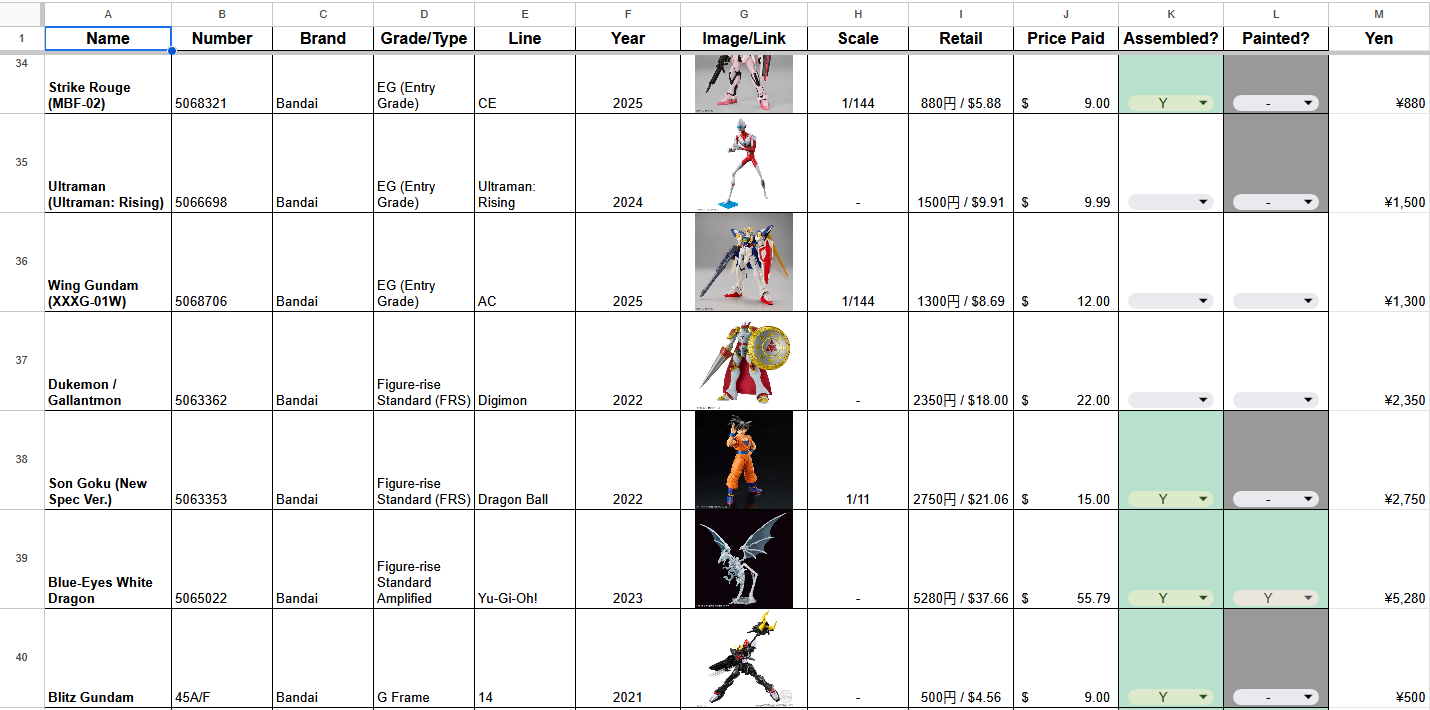
Markdown table with data type guesses if image does not load
| Name | Number | Brand | Grade/Type | Line | Year | Image/Link | Scale | Retail | Price Paid | Assembled? | Painted | Yen |
|---|---|---|---|---|---|---|---|---|---|---|---|---|
| Gundam Barbatos Lupus (ASW-G-08) | 5055446 | Bandai | HG (High Grade) | I-BO | 2016 | [Formula1] | 1/144 | [Formula2]/[USD Retail] | $10.19 | Y/N/'- | Y/N/'- | 1000 |
| [TINYTEXT] | [VARCHAR] | [TINYTEXT] | [TINYTEXT] | [TINYTEXT] | [YEAR] | [TEXT] | [FLOAT]/[SMALLINT]/[TINYTEXT] | [DECIMAL] | [DECIMAL] | [BOOLEAN] | [BOOLEAN] | [SMALLINT] |
There are only a few formulae used:
- One to both link to a webpage for that kit and display an image of it; these could be easily separated into two fields
Formula 1:=HYPERLINK("https://bandai-hobby.net/item/5886/",IMAGE("https://bandai-hobby.net/images/157_5886_s_5pwg9tvxlm5v4gwrz49ly8ry3j8e.jpg")) - One to convert the Japanese retail of a product (in the
Yencolumn) to equivalent USD in the release year (could easily be replaced with a manual conversion or a researched US retail)
Formula 2:=M36&"円 / $"&TEXT(M36*VLOOKUP(F36,'Currency Rates'!$A$2:$B$52,2,FALSE),"#,##0.00") - And one to grab the current average conversion rate for the year (again, could be replaced with a quick search)
Formula 3:=QUERY(GOOGLEFINANCE("CURRENCY:JPYUSD","price",DATE(A47,1,1),IF(DATE(A47,12,31)-TODAY()>0,TODAY(),DATE(A47,12,31)),"DAILY"),"select avg(Col2) where Col1 is not null label avg(Col2)''",1)
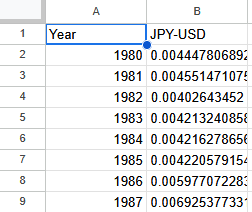
This last formula is used on a conversion sheet referenced in Formula 2, which looks like this:
I appreciate any help.
Homebox may be a good fit. HomeBox
Note, I don’t think it supports linked images although you can add the images directly. I also don’t think its purchase/sales price can be set to dynamically provide currency exchange. Honestly haven’t looked at that feature in homebox.
That may work quite well, and my reverse proxy already has an example config for it. I’ll look into it some more. Thank you.
I have spun up an instance and made use of the csv import. So far my main complaints are the lack of bulk image uploads (that I’ve found) and a seeming inability to generally browse items (except by location).
The label system is quite useful, although I do wish there could be tiers of labels, or maybe category options that function similarly to labels but in a different part of the UI.
Thank you again for the suggestion; I’ll continue playing around with it while I look into others suggestions.