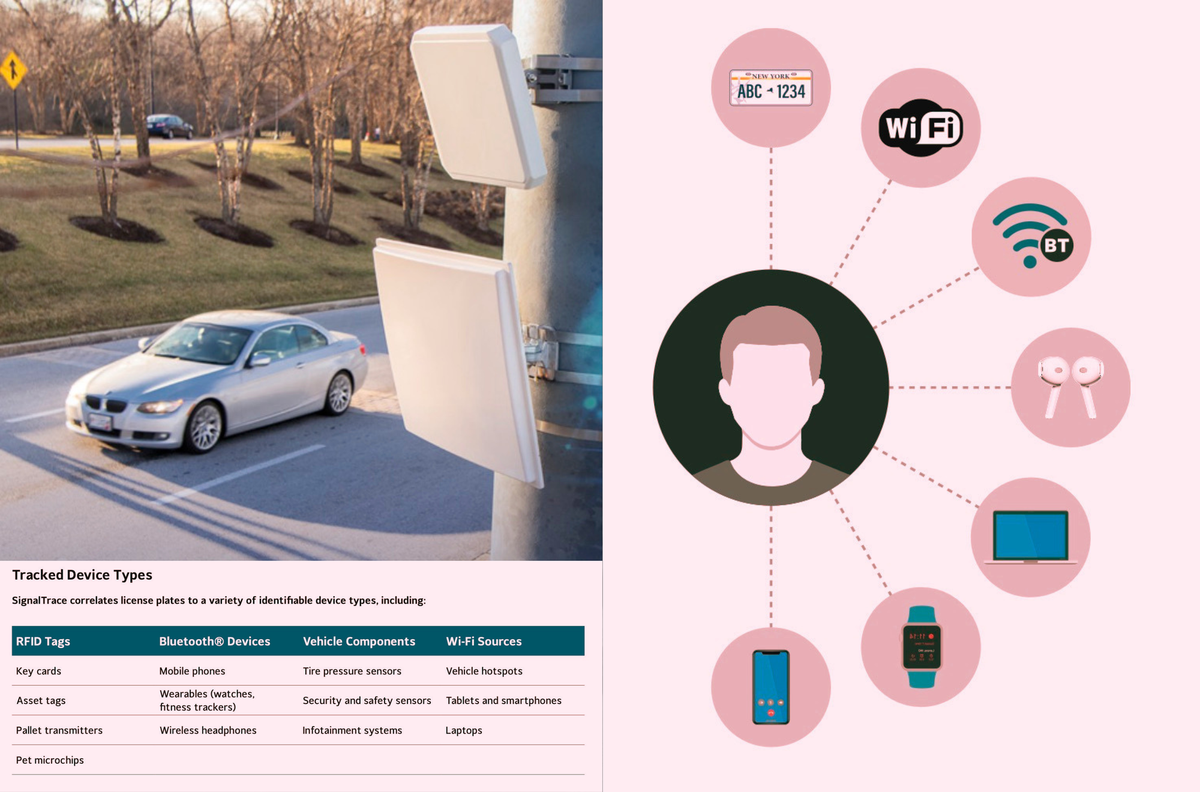
SignalTrace “links devices that regularly travel together, correlating them to license plate.” It is a surveillance product that will sweep up and add all sorts of Bluetooth and other data to license plate readers, linking specific devices—and people—to cars.


Does it also disable BT low energy?
BLE would fall under BT, so I would think so. Airplane mode would disable all radios.
https://news.ycombinator.com/item?id=39977355
Does it work on it too?
OK, waaay late to a better response.
If you’re on Android or an alt OS, you can go into developer options > Bluetooth LE Audio Mode it’s defaulted to “Unicast and Broadcast” but I’ve disabled it.
Maybe that’ll help someone!
But can you do it for wearables?
Most wearables I do not believe BLE can be disabled without powering off the device. It’s made me conflicted inside bc I just bought A Nothing Watch 3 and use GadgetBridge, but not if its radio signature is (eventually) going to be used for bad… I can see flock implementing this.
I guess the real issue after thinking on it, there’s no way to disable the wearable’s BLE/BT as those are always on. You might have to power it off to truly disable… According to a few different sites, disabling BT would also disable BLE as is the same chipset, but again that’s only your phone.
Even though I use GadgetBridge for my wearable, I think I’m ready to get rid of it all together. I don’t need to count my steps after all nor heart rate, etc 😅
My old phone is still Android 12, if I enable Airplane mode, WiFi, cell, BT turn off immediately. Idk About newer OSes like that says. You could maybe it’s a different phone with BLE to test scanning for other devices?? Idk, I gotta look into this one now! TY for sharing.