Tried use GIMP a few times, but the standards feels way too different from Photoshop.
Like basically everything.
I’m not a designer, but I use such tools once in a while to make some images, and GIMP is nearly impossible to use for me.
Currently I’m sticking with Photopea on browser.
Tried use GIMP a few times, but the standards feels way too different from Photoshop.
Because it is different.
and GIMP is nearly impossible to use for me.
As long as you wish it to become Photoshop-like, it will remain ‘impossible’. Bu the moment you agree that it is not some free clone of Photoshop but its own thing, it starts becoming… not impossible. And I say that as an almost 60 years old dude that had been using Apple computer since the early 80s and purchased and started using Photoshop for my job in the late 90s, that is now using GNU/Linux full time.
Imho, the best way to learn Gimp, or any new software, is not to wish for it to be more like Photoshop (or any other software you may previously used) but to start using it… from scratch and to do it progressively.
Don’t try to master it or to reach the same level of expertise you have under Photoshop (this took you probably a few years, at the very least a few months… and I’m sorry to say there is no shortcuts: learning takes time. But if you give yourself small specific tasks to learn to do you will quickly see yourself getting better… faster and faster.
Not knowing what you used Photoshop for it’s hard to suggest anything but say you used to it to edit your photos. Make a list of all the things you used to do, not the tools you used to use under Photoshop just the task you want to achieve. And start learning them one at a time.
Say, learn to crop and to resize a picture. Next time, learn to change file format or to color correct. Learn to change exposition or use curves. Learn to use masking tools to do local edits, use layers, and so on.
You will also realize there are tools you used to use that have no equivalency under Gimp. And that there other tools that exist under Gimp. But learning the tools and methods one at a time will make it much simpler:
- you won’t need to be looking in those endless menus with their endless options all at once, nor to learn all the keyboard shortcuts (that is essential to learn if you want to be more efficient, like with any app worth something)
- you will only need to search for specific tuto or guides, asking precise questions: ‘how do I change gamma in Gimp’ ‘how do I change color balance’, ‘how do I crop’, and so on… that are more likely to bring you much more useful results than broader questions like ‘how do I learn to use Gimp as a previous Photoshop user’ ;)
edit: typos
There’s different and then there’s worse. I switched to Linux a few months ago and gimp fits the latter category more often than not
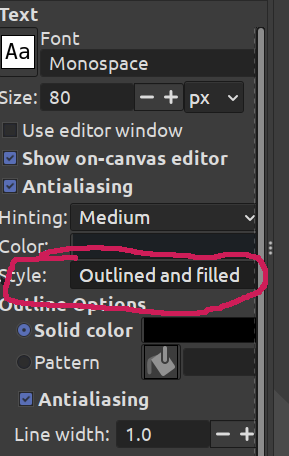
I could not believe the answer I got when I looked up how to add an outline to text (select the pixels, grow selection, make a new layer, fill it with outline color)
In my case as I have only used gimp and never photoshop, that’s the only way I know how to do it. Once I’ve had to use Photoshop (or maybe it was illustrator) and I couldn’t even understand the selection… Why does the cursor changes color? It was really confusing for me and I find Gimp much easier to use. Okay I’m not a graphic designer so maybe that’s different for professional use, but mostly a software you’re used to can do most of the tasks better than a software you don’t know how to use… But that’s just a user problem, not a software problem.
There’s different and then there’s worse. I switched to Linux a few months ago and gimp fits the latter category more often than not
A good first step in learning anything new is to realize one’s own opinion about it is just that: an opinion, not a fact. Then, it helps to keep in mind that one’s expectations are also very often nothing more than the expression of previously acquired habits. Habits that also happen to be one of the hardest thing to change.
Gimp is not worse, nor is it better. It’s a tool for anyone to use or to not use.
It’s also not a clone of Photoshop, and I don’t think it wants to become one. Does being its own thing make it “worse”? Maybe, for some users. You seem to be one of them. That’s OK.
What do I think of Gimp? I seldom have emotions towards tools, beside in the case of Free/Libre software a real feeling of gratitude for the people sharing them with all of us (making me even more willing to support them back). Those tools I either use them or I don’t.
Like, no matter how impressive it is (and it is), I don’t use Krita to sketch because I prefer sketching using a pen and paper instead of a screen or a tablet. Heck, I don’t even use my iPad/Apple Pencil to sketch not even with the Procreate app I purchased many years ago.
It happens I do use Gimp on occasions, when I need to. And since I sometimes need to use Gimp I decided it was a good idea to learn to use it properly, to the best of my ability, aka by not comparing it to Photoshop (the app I had been using for almost 20 years before that) but by trying to understand its own logic. Am I an expert Gimp user? Lol, no. Will I ever be? Nope, I have no need to. Which is fine too.
The same with Darktable. Up until a few years ago I used to do a lot of photos. I had been doing phos since the late 70s. For the last 20 years or so I had been using raw file formats so I searched for an alternative to Lightroom. I tried hard to learn Darktable and I failed. No hard feelings, I simply realized it was not worth me doing all that learning since I was now doing so little photography I could as well stop using raw entirely, not a huge loss. Would I have been taking more pictures, and need raw, I would have kept a Mac with Lightroom for that purpose only. I know very few toolboxes that contain one single tool ;)
One last point that may be worth repeating, over and over again:
It’s ok to not like something, an app, a book, music, a color, some food, or even a person. It just should not mean that that one thing/person is bad. There is no need to make it emotional.
If Gimp does not work for you, say like you switching to Ubuntu may not feel that good either compared to your previous OS, then there is no harm in moving back to your previous app and OS, or to try different ones.
Before settling on Linux Mint myself, which I have been using for the last 6 or 7 years (already? Time flies!) I tested Debian, and before that I tested Arch, and before Arch I first tested… Ubuntu. Mint just felt best for my own needs back then.
Text has an outline option in gimp.
Those instructions are likely all that Photoshop is doing behind the scenes, more or less. Having to do it manually gives you control over all aspects. Want to feather the selection, to make a glow effect? You can do that. Want to make the outline a rainbow gradient? You can do that too. Want to make the outline a cutout of another picture? Turn the selection into a mask and apply it to a layer with the picture you want. Make the outline blobby? Fill, blur, adjust levels.
GIMP does not have the same focus on usability that PS does. It’s intended to be sufficient for your needs, without extra cruft and piles of macros that you can do yourself. This doesn’t necessarily make it better, mind you - but after taking the time to learn GIMP, I haven’t really missed Photoshop. (Especially after Adobe moved to their *^@# subscription model.)
Well, there is this:
edit: see comment below
Otherwise, I think the best way to go forward is just to watch tutorials and practice. I made the transition several years ago, and it helped to have the expectation similar to learning a new language. The more you accept that you will have to take it slow and look everything up at the beginning, the better your experience will be.
This link is not the real one! The download button on it is spam. https://github.com/Diolinux/PhotoGIMP
Thanks so much for catching that!
To make images? GIMP is for photo manipulation, not drawing. Try Krita or Inkscape.
I gave up on GIMP because of this too. I tried to learn, but learning another completely new software is still better than learning GIMP. For both painting and photo manipulation, Krita feels smoother.
photo manipulation
I could recommend darktable, if I may.
Yes, Darktable is great. I use that too.
You could always try Krita instead. I find Krita is more like Photoshop. I’m not a big fan of Gimp.
I like kolour too but moved to gnome and there the equivalent is Drawing
check out the PhotoGimp add-on, it might make the app feel more like what you’re used to.
Gimp is weird. However, if it doesn’t click with you there’s other options (depending on what kind of workflow you’re trying to do). Personally, I prefer Krita, but inkscape is also an option.
EDIT: i was just scrolling through alternativeto about photoshop and found photogimp, looks like a fork of gimp intended specifically for photoshop users.
see the list yourself
https://alternativeto.net/software/adobe-photoshop/?license=opensource
Inkscape is even weirder if you’re coming from PS/GIMP/anything else that’s primarily a raster image editor. I do like Inkscape but it’s not immediately obvious how you even draw anything; I had to look it up.
Yeah I use inkspace mostly for vector stuff
Switching is so worth the effort. As someone who used Photoshop since it’s initial version, until last year, it took me a while to get used to GIMP. But now I must admit that I love it. Keep with it and you will love it as well.
https://youtube.com/@logosbynick
I have found this guy’s tutorials really straight forward and helpful. He has a lot of tutorials but…
That video goes over all of the basic tools specifically if that is helpful.
I’m wondering now if I try to learn raw GIMP or use the plugins to make it feels like PS like a few people suggested me…
This might be of help to you.
(Edited to show better link)
Photogimp dot com is either compromised or a fake entirely. The download button send u to random spam sites The plugin in question can be had at github https://github.com/Diolinux/PhotoGIMP
The download button on https://photogimp.com/ shows https://github.com/Diolinux/PhotoGIMP when I hover over it and that’s exactly where it took me.

IDK where you’re getting that from.
Did you press it or any other link on the page? They show as girhub for me too but it actually takes you elsewhere
Edit: just tried on pc and it goes to github. But firefox and safari on iphone doesn’t


This one is nsfw
Tap for spoiler

Ahh, I see now. My uBlock Origin blocked it and made it work correctly.
Sorry, been about 15 years since I browsed the internet without an ad blocker, I forget it’s there!
There seems to be a javascript that loads from cloudfront with a url redirect thing. Also loads tonnes of third party cookies Sadly no adblock on ios :(
Ahh, uBlock said it caught something from one of the advertising filter lists I have.
Yeah, I clicked it and it took me to the github.
It seems normal for me on pc too but not on mobile. Also noticed this

I also use Photopea for tasks I used to do in Photoshop. It’s not the best but coming from Photoshop it’s very easy to use.