tmpfs on /run type tmpfs (rw,nosuid,nodev,noexec,relatime,size=1616504k,mode=755,inode64)
tmpfs on /dev/shm type tmpfs (rw,nosuid,nodev,inode64)
tmpfs on /run/lock type tmpfs (rw,nosuid,nodev,noexec,relatime,size=5120k,inode64)
tmpfs on /run/credentials/systemd-journald.service type tmpfs (ro,nosuid,nodev,noexec,relatime,nosymfollow,size=1024k,nr_inodes=1024,mode=700,inode64,noswap)
tmpfs on /run/credentials/systemd-resolved.service type tmpfs (ro,nosuid,nodev,noexec,relatime,nosymfollow,size=1024k,nr_inodes=1024,mode=700,inode64,noswap)
**tmpfs on /tmp type tmpfs (rw,noatime,inode64)** (i am guessing it's this one)
tmpfs on /run/user/1000 type tmpfs (rw,nosuid,nodev,relatime,size=1616500k,nr_inodes=404125,mode=700,uid=1000,gid=1000,inode64)
tmpfs on /run/snapd/ns type tmpfs (rw,nosuid,nodev,noexec,relatime,size=1616504k,mode=755,inode64)
i hope these are all as konsole doesn’t seem to have a search function in kubuntu, why?
Everything under /run and /dev is normal to be on tmpfs and should not be changed.
In Linux, a lot of internal systems and devices are considered as files even if they are not really a file in the usual sense of it. For example what is in /dev is usually not really taking up RAM space but more of a representation of the devices (internal and external) that are attached to your system. You can programatically read and write to these “files” to communicate with the devices.


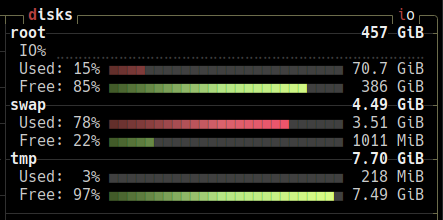
tmpfs? If so this is in RAM. You can check with
mount -lit lists multiple tmpfs:
tmpfs on /run type tmpfs (rw,nosuid,nodev,noexec,relatime,size=1616504k,mode=755,inode64) tmpfs on /dev/shm type tmpfs (rw,nosuid,nodev,inode64) tmpfs on /run/lock type tmpfs (rw,nosuid,nodev,noexec,relatime,size=5120k,inode64) tmpfs on /run/credentials/systemd-journald.service type tmpfs (ro,nosuid,nodev,noexec,relatime,nosymfollow,size=1024k,nr_inodes=1024,mode=700,inode64,noswap) tmpfs on /run/credentials/systemd-resolved.service type tmpfs (ro,nosuid,nodev,noexec,relatime,nosymfollow,size=1024k,nr_inodes=1024,mode=700,inode64,noswap) **tmpfs on /tmp type tmpfs (rw,noatime,inode64)** (i am guessing it's this one) tmpfs on /run/user/1000 type tmpfs (rw,nosuid,nodev,relatime,size=1616500k,nr_inodes=404125,mode=700,uid=1000,gid=1000,inode64) tmpfs on /run/snapd/ns type tmpfs (rw,nosuid,nodev,noexec,relatime,size=1616504k,mode=755,inode64)i hope these are all as konsole doesn’t seem to have a search function in kubuntu, why?
You are correct this is the one mounted on
/tmp.Everything under
/runand/devis normal to be on tmpfs and should not be changed.In Linux, a lot of internal systems and devices are considered as files even if they are not really a file in the usual sense of it. For example what is in
/devis usually not really taking up RAM space but more of a representation of the devices (internal and external) that are attached to your system. You can programatically read and write to these “files” to communicate with the devices.In Linux, everything is a file
for a more readable output
df -ht tmpfsthanks! but it’s unclear how to tell it lives in RAM…
tmpfs is a memory filesystem, they all do
https://man7.org/linux/man-pages/man5/tmpfs.5.html
one-liner to get the total used size
/usr/bin/df --type=tmpfs | awk 'NR>1 {sum+=$3} END {print "tmpfs used (MiB): " sum / 1024}'