Source from HN because they have shadowbans: https://news.ycombinator.com/item?id=47773594
I’m wondering too what you are looking for in a font. Good looks, features, options to enable or disable, ligatures?
I’m not terribly picky, mostly just want to distinguish 0 from O and l from 1.
I rather like JetBrains mono though.
And l from I from | from 1. Stuff like that. And be pretty. And somewhat retro futuristic, without sacrificing readability.
Recently switched to Maple Mono because it is fun and cozy.
I’ve been using JetBrains Mono and Maple looks the same but nicer. Thanks!
Connected strokes in italic style, vivify your code.
That’s cool and interesting (you can see it in action and toggle-compare on the linked website)
I wonder how distracting it would be in code, though. If it is, their configurability allows skipping that feature though, which is great.
Yea, as its only applied to italics its less distracting than it might seem at first. Your IDE may not even use italics. In VSCode with my theme, italics are used for comments and variable names, which looks like this:
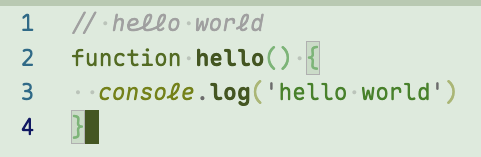
I like to use this style of italics for keywords. (That’s also what the Maple examples do.) My thinking is you see keywords so often that you recognize them by shape, not by reading the individual letters. And my theory is that the italic variant being a little harder to read helps my eyes skim over keywords, to focus more on words that I do need to read precisely, like variable names.
It does mean that I spend some time customizing my syntax highlighting theme to make it work the way I prefer. I’ve got examples set up on my blog. Although that’s not Maple - it’s a different font with cursive italics called Cartograph CF.
Oh wow that looks pretty and also makes total sense in theory. I think I have seen it in other places as well and might just steal that. :) Thank you for pointing that out.
Why is ‘l’ the only cursive letter (and not connected to anything)? It’s kind of jarring
I don’t like that one and the same character looks different on the same line (here
console.log).
Yes! I built my own variant using their tool (removing the weird italic l etc). I love it.
This is a great find. Thank you very much kind internet stranger
No ligatures, and no ambiguity between O and 0, l and 1 and I, etc.
No serifs too, I guess. Although I don’t think that’s very common in coding fonts.
Nice to look at. Disambiguates commonly confused characters (
l,1,I;0,O).Ligatures, slashed zeros, clearly distinguishable Il1/O0, not too big of a gap between lines, and maybe script-like italics. My current main monospace font is IosevkaTerm Nerd Font.
I also find the idea of using retro pixel fonts interesting, but so far couldn’t get myself to actually try some of the fonts mentioned here: https://news.ycombinator.com/item?id=47708411 .
Good readability of code.
I use Fira Code for coding, mostly because of the ligatures. For console I use Inconsolata because it’s compact and good for long console lines.
I admit that https://github.com/tonsky/FiraCode has the best presentation.
I want it to be Iosevka
Thank you for reminding me of this font name. I did a clean install of my OS a few weeks back, and forgot the terminal font I had been using
Mainly that I can clearly distinguish Il1 and 0O. I like DejaVu Sans Mono because it does that; if I’m limited to fonts preinstalled on Windows, Lucida Console works too.
For mono space I’ve been using Ubuntu mono for a long time, there may be better but it was good enough when I was choosing and I haven’t had any issues that made me want to pick a new one. For standard I use open sans.
I really like the Ubuntu font family. Been rocking it on my Bazzite install for a bit now
Not that big on ligatures in monospace, really. I think I just go with what seems to look kinda nice and has a big enough amount of symbols to not look weird once a few of them are needed.
Also generally prefer dotted zero, or an inverse Ø. Fonts that make 0 and Ø look the same might as well just drop the slash altogether.
In spite of that I’ve been using Fantasque Sans Mono for years. At least the slash in its 0 doesn’t extend beyond the circle like in an Ø.
This is my choice too. I love it.
Everything VictorMono offers, exactly as offered. Also good for me to be able to distinguish O, 0, and Ø.
I like it, it’s pleasant to my eyes. Thanks.
+1 for VictorMono. It’s the best.
I love iosevka because it’s so condensed. You can fit so much on the screen.
I love narrow fonts because it feels like regular text, but monospaced at the same time, and lines are easier to read too.
I am a big fan of MonoLisa, but it is a paid font.
I wasn’t convinced initially (never paid for a font before!) and found some version of it online, found that I liked it very much, then willingly parted with my money for a license.
I really like the difference between normal and italics, I set up my code editor to use italics for comments.
When you said ‘paid’ I was thinking £5, not £50 (for the basic version!)
On PragmataPro, I know it’s a bit pricey (60 euros) but I’ve been using 12 hours a day for years, it has a lot of characters available, supposedly hand-made, and the guy updates it regularly.
I have bought software that was more expensive but had way less usefulness.
Yeah that’s why I found an “evaluation” version before. Once I saw it was genuinely great I was happy to pay for a license.
I look at this font 12+ hours a day everyday for work, if this was just for ricing a terminal window I agree it is a bit steep.
Distinct lower case connections
I stopped reading right there 🙂
For me, distinguish similar letters such as 0, O, I, l, 1. Then I want ligature because I like them, then emojis should align vertically to the grid, high resolution for small font sizes, size difference between tall and not-tall characters, and it shouldn’t have narrow characters.
Last time when I was changing up the font I went to https://www.nerdfonts.com/font-downloads and tried out a couple until I found one that I liked. I’m really picky about the symbol shapes, I most often just bail on a font because the @, % or & is ugly I might also bail if ` vs ’ is not distinct enough.
Some fonts have absolutely wild italics that are almost cursive which is a hard pass. Even though I only see it once every week maybe I’m just not up for it.