

Maybe a hot take, but I do think that this is correct for trackpads. Not for mice though.
Right, I associate scroll wheel to the scroll bar so it makes more sense to pull it down to push the content up. Trackpad is closer to touchscreens so it’s the opposite.
If you’re on a scrollwheel, you’re rolling a wheel down the page. The viewport moves and the page stays still.
Sliding the scrollbar does the same. It moves the viewport.
On a touchscreen, you’re pulling the page directly. The page moves and the viewport stays still.
A trackpad? I like to think that it’s sliding the scrollbar, not the document.
Except if you learned touchpads before touch screens, your mental model is that you’re still sliding the viewport down. Hence the option to disable “natural” scrolling.
If you learned on touch screens, maybe the scroll wheel will feel more “natural” if it moves the page
I don’t even like it on trackpads. Down should be down.
I feel like it’s more of a physical analogy in moving my fingers up to scroll down. It’s like I put my fingers on a piece of paper and dragged it upward, that’s how I would “scroll down”.
I agree, I’m used to the opposite now but “pulling on the content” like you do with smart phones makes more sense.
I even use it on scroll wheels. It just feels natural LOL.
This.
I prefer the direction apple doesn’t call “natural” and I don’t appreciate the implication my preference is “unnatural” because of it.
The whole point is that people have different mental models of these things.
I was using a trackpad before I’d ever owned a device with touchscreen, and so my concept for trackpad is based on mouse:
- Moving the cursor with a finger is like moving a mouse on the desk - movement agrees with direction
- Scrolling is like treating the trackpad as a ‘virtual mouse wheel’ - towards you moves the content up.
And as for why I think a mouse wheel itself should behave like that? It’s because my mental model of the mouse wheel from the beginning was that it’s a literal physical cog like a roller pressed “against” the view content - and so when the top of the roller moves down the underside of the roller moves the content up.
All the people who grew up with phones will insist my preference is wrong and freaky and I don’t blame them because I think theirs is.
There’s no actual wrong or right here, just whatever collection of mental models built up since childhood our life paths caused us to form.
- Moving the cursor with a finger is like moving a mouse on the desk - movement agrees with direction
This is where I am as well. I think of scroll direction as the way I move the “camera”. The direction of the wheel is the direction of the frame.
We arrived at the same conclusion, but for different reasons!
You see the wheel as moving the viewport directly (wheel down = view down)
I see the underside of the wheel as pushing the page/document/etc upwards (wheel down = content up)
Same preference but the mental model is different. Which is fine, and is really my exact point :)
This is why I’m a big fan of always giving options in games etc to invert the controls, and invert x and y independently and all that. You might think “what freak wants this crazy setup?” but SOMEBODY wants it, and if you can give the option then why not! Sometimes the freak might be you.
This sometimes reminds me of the “invert Y-axis” for camera controls in video games, where someone’s preference can basically determined by the question “Are you old enough to have played the original MS Flight Simulator as a child?”.
Someone’s preference typically reflects their tactile experiences that they made with their hardware early on, and once something feels “right”, there’s usually no convincing them it’s not (and indeed no point to it). It’s an artificial thing you have to get used to, one way or another, and there’s really no right or wrong way to go about it.
Maybe I’m weird, but for me it’s always non-invert for look controls, but as soon as I’m in a plane or ship it must be invert.
This is default in most modern games.
Yes, definitely weird. Might be a brain tumor.
I’m not sure how you’re controlling a ship’s Y-axis… but for planes and helicopters that’s absolutely standard and how it works in the real world. Hence the term “Pull up!”
The one or two pilots in this thread just read this in the GPWS voice and feel their heart beat a little faster now.
which is why i wish they wouldn’t label one paradigm “natural”
It really does feel like it’s done as rage bait
The imagine I have in my head to somehow relate to how inverted-y axis makes sense is that “normal” mouse movement you use the mouse to point where you want the nose to go, mouse goes up, nose goes up. While inverted controls a little stick poking right out of the back of the head, move the stick/mouse up, and you’ll tilt the head down. Doesn’t take into account inverted x movement though 😄
I think it was in Halo’s tutorial where they ask you to look up, and whatever up or down movement you did on the stick would be considered up. So whatever first impulse you had of pushing the stick up or down would become the looking up direction. Pretty clever.

Isn’t this the default Mac behavior?
And if it wasn’t for the pushback, it would have been the only Mac behavior.
it’s become the default on mac, windows, and gnome, much to my dismay. i even had to install a gnome plugin to get sanity back
i even had to install a gnome plugin to get sanity back
Gnome is open source mac UX
You can’t change my view.
Also, its ironic that KDE used to be the weird one, and Gnome the “normal” one. And all the lightweight DEs are based off pre-mac gnome.
As someone who uses GNOME everyday, and has tried macos in the past, no, GNOME is nothing like macos
The only reason to think so is the lack of start menu, which is a windows thing
I like gnome and I like OSX, and I agree. They’re very different.
I dislike gnome and I dislike OSX, and I agree. They’re very different.
Lack of start menu and weird ideological destruction of options and good design.
User experience philosophy, not “everything is exactly the same”
Gnome3 design doc said they surveyed mainly US students.
To what end?
Switching windows with alt-tab, alt-tick, switching tabs with ctrl-pgup/pgdn, keeping windows in place when switching external monitor, mirroring external monitor (keeping resolution when cable unplugged), select to copy, middle button to paste — All of those operations are not the same on gnome as they are on MacOS, and no they cannot be configured to be the same. I know this because otherwise I wouldn’t be fighting with my company right now who is trying to get me to switch my main work laptop from Linux to macOS. And if they succeed in doing that, it’s going to drastically slow me down because of all the shit I just mentioned. Edit: and probably a bunch of stuff I forgot.
User experience philosophy, not “everything is exactly the same”
If it is, may those responsible burn in hell.
Only because Steve Jobs wants to be whimsy
And look where this whimsy got him.
Yes, scrolling moves the content. As if it’s being gripped by the bottom of the wheel I’m rotating with my finger from the top.
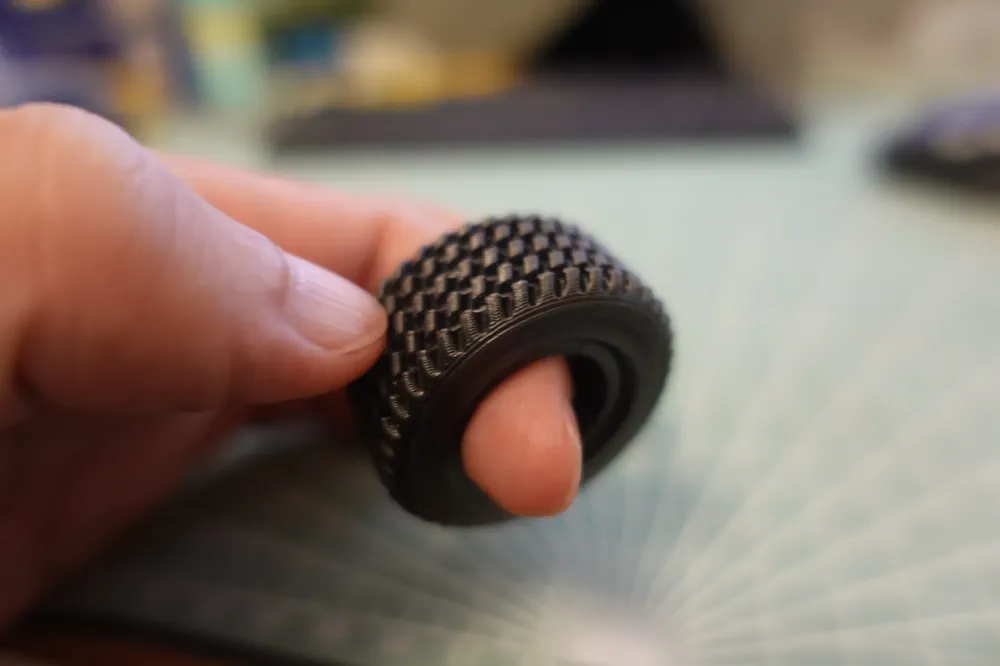
Imagine a toy monster truck on a sheet of paper. Push the wheels forward, page moves backward.
Inverse scrolling is like a high-heeled rubber shoe attached to the tip of my finger advancing the page. There’s some logic to it but that’s not what a wheel is like unless it’s an Apple mouse’s touch wheel. But they can’t be trusted to design a mouse: one had a circular cross-section, another charged from the bottom.
The big question is: which is natural? Fortunately, mice exist in nature so there’s a way to find out. Hold one tightly like this, release the front hand… Which way will the cloth move?

Ah, I see the problem. You’re using a rat, not a mouse.
Good computer mice are rat-sized and feel like a toy car when gripped. Not a puck. Anyway, I couldn’t find a suitable image featuring a mouse.
Just set it to whatever you prefer. Who cares which direction other people scroll?
I do, briefly; when someone hands me their laptop and asks me to fix something.
On a touch screen, this movement is natural because you’re interacting with the content on the screen, not the view.
For a mouse, where you’re likely navigating multiple views across different windows, you’re manipulating the view instead of the content and in that context “natural” is an improper term to describe the motion.
It depends entirely on the convention of the environment.
My work computers have been Macs exclusively for about 8 years, and the scroll wheel on my gaming PC feels weird now.
It’s the default for trackpads on Gnome too.
In ancient times when planes had a simple stick for controls, you pull back to go up and push forward to go down.
You still do, though?
what else is the scroll wheel for?
Usually the scroll wheel moves the viewpoint, not the content. I.e. Scrolling the top of the wheel towards yourself (“down”) moves the viewpoint down the page, making the content appear to move up.
Not just usually; this is how WIMP user interfaces have worked since the 80s, regardless if you use a mouse or another device (e.g. keyboard) to scroll the viewport. It’s built into the data model of the UI toolkit.
Scrolling the normal direction
This is a heated debate in computer assisted modeling/drafting. I forgot between solidworks, unigraphix, or one of the autodesk softwares which had a reveresed scroll default but it was different and a lot of people were trained opposite of everyone else.
Thats before you even get into a debate about how a spacemouse is supposed to be set up.
The last time I was thinking that way was when I was 5 years or so old and first introduced to a mouse and playing around on the “die Sendungen mit der Maus” Website. Im not using Windows that intensive anymore, is that fucking real?
That’s not windows, that’s GNOME.
I hate GNOME
If you scroll UK, should the scrollbar go up? Or should the page go up?
If you scroll UK they end up near Iceland
Do you still have to drive on the left when driving the UK, or do nautical regulations override that?
I have long preferred “natural” (“Inverted” in KDE) for touchpads, and the opposite for mouse scroll wheels. Until reading this thread, I don’t think I’ve thought about it that much.
I just experimented with switching, and I dunno… I might try using inverted for both for a while. They both feel fine for me after a few seconds of orientation.
Well, duh.
deleted by creator