Uninstalled within seconds. I’m trialling Hyperion launcher now, which seems pretty crisp.

This is amazing. What is it from?
Ready Player One (2018)
Nova sold to shitheels, I switched to Lawn Chair a customizable FOSS Launcher
Lawn Chair looks ok, but unless they fix this issue I will not switch.
https://github.com/LawnchairLauncher/lawnchair/issues/2683
Basically you can’t set the main “home page”, ie where you end up on home press. I like to have it set up so the home is in the middle and then you can swipe left to go to another screen(s), and swipe right to go to other screen(s).
Forcing the home screen to be the first means you can only swipe right, and have to go through many useless screens to get to the one you want.
Doubt they will fix it either, as it has been open since 2022. Without knowing their stack it sounds like a really simple fix, just storw which is the main screen. Normally it is [1], 2, 3, 4. But let the user choose to put it as [3] for example if they want.
I’ve switched, but this really is my one major gripe. Good to see others see it as a priority too, but if it’s been a conversation for 4 years then I’m not optimistic
and have to go through many useless screens to get to the one you want.
Two things.
Clean your shit up and prioritize. Everything I could ever dream of is on one screen.
Second, it’s foss. Contribute.
Or, hear me out, solve this trivial problem by reintroducing what has been a basic feature of launchers forever.
Has it though? I can’t say I’ve ever seen it, and I go out of my way to look at settings for everything
It makes sense to have it, but what is one thumb movement really? After once, the benefit goes away. And even then, it’s literally a thumb movement, and it’s to access something that you use so little, that you’ve put out of the way. You’re saving like a swipe a year at that point. I’d deprioritize the fuck out of this
What an odd hill to die on. Honestly I’d deprioritize the fuck out of this
They hate when I say it, and love when you say it lmao
Classic “the product/UX doesn’t need fixing, you’re just using it wrong” mentality. Not exactly how you win users on your side.
Second, it’s foss. Contribute.
Agree on this point though
I like having home on 3.
Only a calendar widget on 2 (one swipe left), so you get a quick glance of upcoming events. Then two swipes left are various games. One swipe right are various overflow apps from the main screen.
People use software differently, just because you don’t agree doesn’t mean it is wrong.
Like I said, I understand it, but I’d deprioritize it
PR welcome. Either by you, or by paying a dev to do it.
What am PR
Without knowing their stack it sounds like a really simple fix, just storw which is the main screen.
Soooo… if it’s simple… contribute then?
I’ve learned an app’s stack for far more mundane things. If you want others to build something you want, it helps to build things other’s want. Sounds like there would be a lot of interest if you took this on.
They recently started on wraparound homescreens (still a little buggy), so that might indicate they could soon add it. Still waiting on a way to remive widget paddings. In general lawnchair has so much more padding than nova, and not enough customizability to remove it.
Lawn Chair is so good
This might be an unpopular opinion, but I’ve liked lawnchair better than Nova since it was in a pre-release state years ago. I admit I haven’t used either in at least 5 years, probably longer, so this opinion might be grossly out of date, but when I last tried it I was 90% convinced that it was just the KitKat aosp launcher with a material skin. It just felt clunky. Lawnchair actually felt native to newer android versions while still having all the customizations I needed.
Again, I haven’t used either launcher in forever, so take this whole thing with an agricultural block of salt
HHHGHHHGGHHGHHHHMMMMM.
HgMPH.
(Cow noises for you city folk)
Uff I installed it last week but I haven’t had the time to customize it and add all my shortcuts so I’m still using Nova. I definitely need to change it tomorrow
I just tried Lawn Chair. Started building my home screen by adding two games to a folder. It dropped the second game right on my home page as well as adding it to a folder. Then, when I tried to remove the duplicate, it crashed.
I’m guessing this is not at all typical and this is a “me” problem, otherwise nobody would ever recommend it. :P
Plug for open source launchers like Lawnchair
I just checked out the website and I’m having a hard time understanding what the point of it is. I’ve never installed any sort of custom launcher, so maybe I’m missing out, but the application advertises itself on being very similar to the regular pixel launcher, not needing root access, and nothing else. Even in the FAQ I only see that it supports some plugin that upgrades some widget, unless you have root where it supports whatever you can do with the “recents api”. Neither of those seem remotely worth it. So what does it actually do?
I haven’t used the pixel launcher in ages, but last time I did, you could not remove the “search bar”. That alone justifies a different launcher to me.
You can certainly do that now. Main reason I went with it.
So what does it actually do?
It replaces the launcher (“desktop”) of your phone with something else. Maybe something faster, or using less resources, or something you can customize to your taste.
By default it does look similar. However it has customization options comparable to Nova, or at least I was able to easily replicate how I’d configured it.
Sure, but what are those? Maybe I’m the issue, but the website seems to be made for people who are already intimately familiar with the possibilities of a custom launcher, because they’re hardly listed anywhere, there’s no list of features or anything.
Well, there is one list, but it’s
- “Pixel design, but more customizable somehow” How? Dunno, isn’t explained
- “The latest android features” which is cool but also something I have on my stock launcher
- “QuickSwitch support” which is not explained (some research makes me believe it’s API access to the default launcher that’s needed to show recent applications, which is also a feature my native launcher has) and needs root according to the FAQ. So can I not access my recent applications if my phone isn’t rooted?
And the wiki is just from the dev side, which is interesting, but doesn’t provide the proper info. I’m sure it’s cool if so many people here like it, but the website’s doing a poor job at showing that off.
Edit: Basically it seems to me like the selling points of most Android forks, which are generally “We’re slightly worse in some areas, but generally have feature-parity, possibly slightly better customization/settings, and you’re free of Google spyware” which is admittedly a selling point, but here you don’t even get rid of spyware if you’re on regular Android, and if you are already on a fork, then why bother?
You can change the icon pack, font, grid size, colours, etc all to your preference.
I would suggest simply installing it to see if you like it, or remove it if you don’t. Customization is not something easy to describe without listing menu items

The main thing for me, it gets google out of the picture. No AI, no google search bar, etc.
It also allows me to manage apps in the app drawer. I can hide any stock apps, and put less commonly uses apps in to folders (I miss tabs on Nova). Instead of scrolling through pages of home screen, I swipe up and can see all my common apps at once, no scrolling. The home screen now has free space for widgets.
I switched to Lawnchair when Google starting messing with the search bar. They added features right where my thumb would press to use the search bar, so I was constantly opening an AI search that I did not want. Lawnchair let me stick with a launcher I liked and was used to, but gave me the customizability to get rid of bullshit like that.
And I generally don’t like change, and I certainly don’t want to have to do any work to facilitate a change that I don’t like in the first place, but Lawnchair was incredibly easy to set up and go. Runs basically like an app, you change your default launcher to Lawnchair (and I assume this step is similar for any launcher you’d use), and bam, runs on top of everything and that’s that. Simplicity is key for a simple guy like me.
how did you end up in this thread if you don’t already know what a launcher is?
Let’s try a metaphor. Say I have a bike. Someone’s trying to sell me another bike, based on it having two wheels, both compatible with standard tubes, and optionally having a luggage rack, if I bring my own and attach it. Then I would also be asking them what their bike actually does and why I should bother swapping mine out for theirs, because it just looks like an extremely standard bike. It doesn’t mean I do not know what a bike is.
The question about lawnchair specifically has mostly been answered by comments now, but the website still does a very poor job explaining what it does over any other launcher, especially compared to the stock one.
I have to imagine that anybody savvy enough to make the decision to install a third-party launcher is also savvy enough to immediately uninstall that shit.
It pops up just like a gravestone. Bye bye Nova launcher. I guess apps don’t die, they rot from enshitification.
nova was good many years ago. iirc they got bought by an advertising company, and that was the day i deleted it.
Ive been using the FOSS launcher Kvaesitso for about a year now due to annoyances with Nova. It’s a different setup entirely, but I always preferred the app drawer over having scattered icons on the homescreen so its worked great for me. Anyone interested in trying something new should check it out. :)
That’s what I’ve been using, but I still prefer Nova’s ability to create folders, I could open most apps I needed in an instant by sliding to the correct screen, opening the folder and tapping the app. With Kvaesitso even with categories and such it’s much more of a hassle, the fastest way is typing the first letters of the name, not the same.
My biggest gripe with other similar launchers that can also create folders is that they always have an icon with 4 miniature icons on the cover. I wish that another one would give you the option of showing them as stacked instead. It just looks much less cluttered to me that way. I’m just glad I purchased the premium version before Nova got sold off, no ads (so far anyway).
I made pseudo folders by applying tags to apps I wanted to group, gave that tag an emoji, added a few app boxes to the widget page, and added the tags I wanted quick access to into those app boxes. Result looks like this.
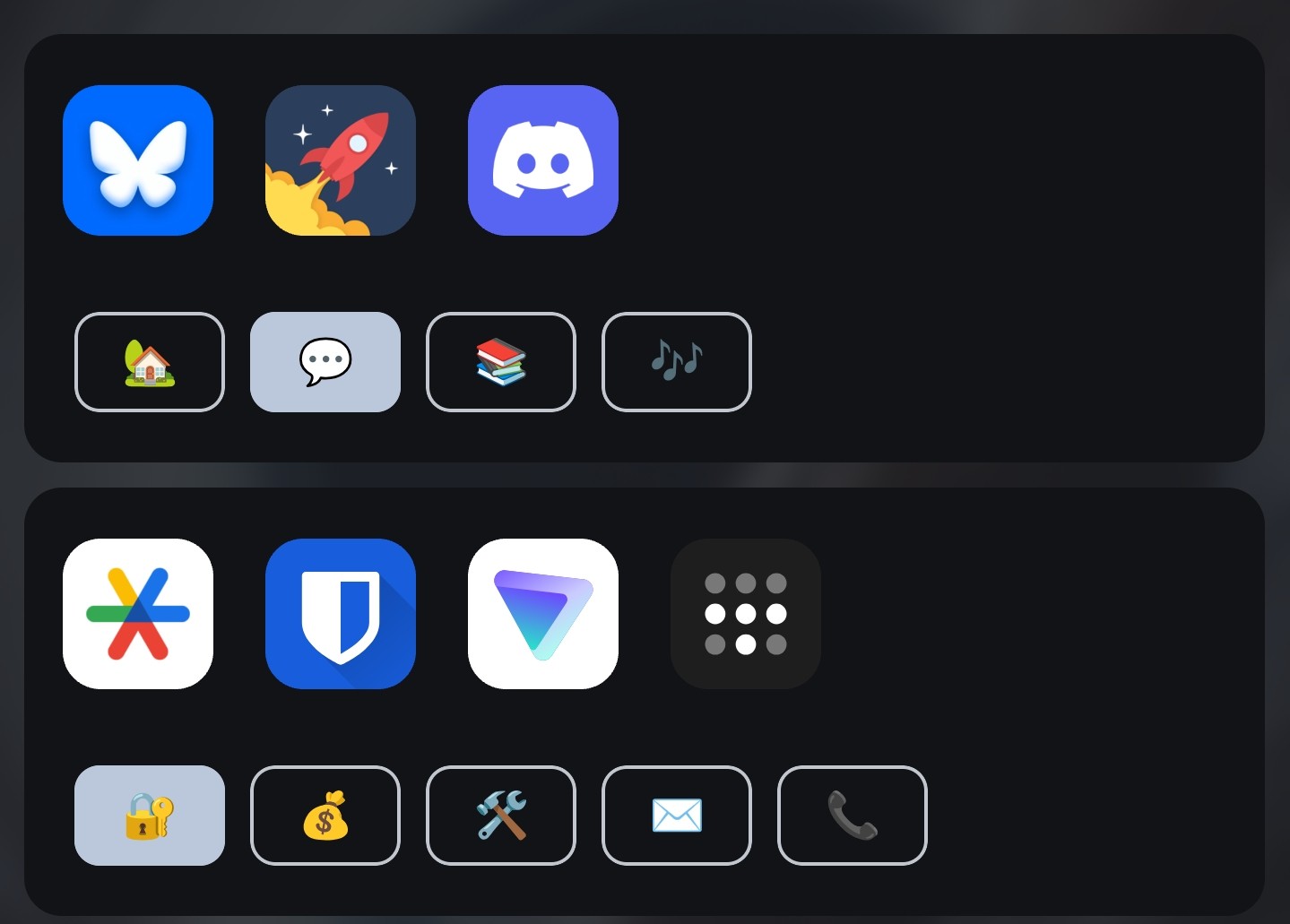
Ok, that’s fucking genius
I disabled the automatic search on mine. So opening the app drawer doesnt automatically prompt searching.
I just open the app drawer by sliding up from the bottom and tap the app I want to open. I set the favorites section with everything I need most often. And the 5 apps on the dock home screen dock for my absolute most frequent apps. Most apps that aren’t in either of those sections are ones I rarely open anyway.
My often used apps are numerous, and there are a few that are not often used but by their nature need to be opened quickly when necessary (such as the camera or qr scanner)… Plus I like to have a monthly calendar and clock on my home screen, those take up quite some space.
The irony of an ad for an adblocker…
My vote still for total launcher.
This post has just reminded me to change from Microsoft keyboard to FUTO. I wasn’t worried about the data harvesting, but it started redirecting my searches to Bing by hijacking the search button on the keyboard.
I’m 30% slower with FUTO though at this stage. Not sure if it’s my swype style being slightly out of calibration or my device is not fast enough to keep up. (Moto g84).
Will see how I get on.
I’ve been using FUTO for a few months now and the Swype and autocorrect are fucking horrible. Still using it because fuck Google I guess, but man I wish it were better.
You can change some of the autocorrect settings. But yea its not the best for sure
I agree it isn’t great. But I don’t want to be in the abusive relationship with Microsoft. Yes I could probably just turn off the deep search option but they’ll just do something else.
Maybe there’s a better option than FUTO, it’s just the first thing I saw as a recommended alternative.
It seems if I swype carefully it’s reasonably accurate but I have to be patient.
Same. I used a different android device the other day that still had gboard on it and the swype felt so much better. Still won’t go back.
Total is truly amazing, especially for a foldable, no match. Few small long standing bugs though, maybe I should take the initiative to report those
Total Launcher is where I landed.
Also, Heliboard is a pretty decent keyboard.
i switched from gboard to ThumbKey. Took some time to get used to, but now the usual qwerty/swipe keyboards seem inferrior to me. Like, swipe is cool and all, but only as long as the keyboard knows the word you’re looking for. As soon as you need to type out anything manually, it always turns into hell
!

I switched over to Lawnchair leaving Nova Launcher just last week. All the Lemmy articles about the new owners forced my hand. Perfect timing!
Moved in the last couple of days to Lawnchair. Very happy with it. You can set the icon size very small to fit everything on the HomeScreen.
I used Nova for as long as it’s been a thing. Paid for pro. Abandoned it immediately after they released the news a few weeks ago about the tracking and ads.
I switched to Octopi Launcher. It’s really good, and in active development. Author listens to his users and is always adding fun new features.
+1 for Octopi launcher. Very nice.
I switched to Niagara a few years ago and can never go back. The alphabetized list of apps and slick scroll are super addictive.
Here’s what it looks like: (ignore the use of Papyrus, I just use it because it drives my friends nuts)


Just remember me posting this is your fault
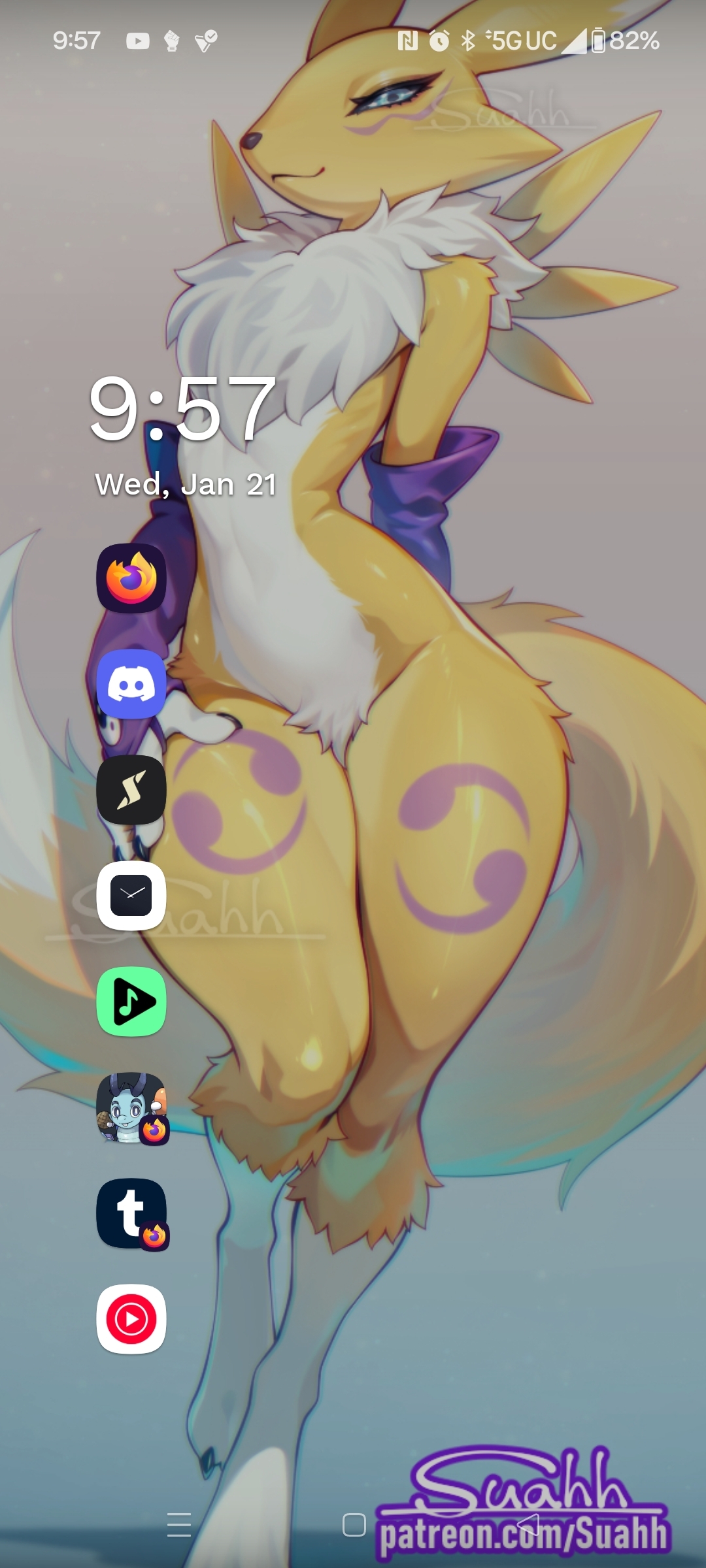
Thanks for the new artist to follow! On topic: Never could like Niagara, it’s just not for me. I’ve just been using a now ancient version of Nova Launcher Prime v7 from before it got sold.
I actually switched to lawnchair a couple weeks ago because magic earth sold out and I realized all profit-motivated, non-foss apps will sell out eventually.
Ricky no!
Think of the children!
You wouldn’t want to subject them to getting into Digimon as a hobby.
(It’s too late for me, I play these shitty video games and enjoy it somehow)They’re still better than what Pokémon has been making the oast few years :3
same and I love it! Hope it stay the same forever as it’s not open source(if I’m not mistaken)

Same to all of that

I love it too!

🥶🥶🥶🥶🥶
PAPYRUS!!!
Yeah, it’s really pleasing

I thought I was a “customize everything” Nova launcher kind of guy, but when I heard the original developer had quit the company that bought it I switched to Niagara. I thought I’d just try it out for a few days, immediately got hooked. Just a few things to set up then your done and getting to everything is so much faster and easier, one handed.

I was watching a youtube video of an engineer student showing off his project. He had a stopwatch app up to show how quickly something was done, and there was a banner ad at the bottom of it. Like, it’s a damn stopwatch, who thought “I worked hard on this, and deserve to make some money!”. Also, how normalized to ads was that person that they didn’t think twice about letting that ad roll in their video.
For anyone looking for more customization, Octopi Launcher has been the closest replacement for me. I’ve tried Lawnchair, Niagara, et al.
I really like Niagara tho, it’s real smooth to use and can look great. But it’s something you have to adapt to, it’s a completely different workflow.
I went from the stock launcher to Niagara and I didn’t feel the learning curve was steep. I did watch a couple of their YouTube videos first before switching.
Yeah, it’s not that it’s hard to learn, but it’s simply a completely different concept. The tutorial videos were a great help!
Octopi launcher so far looks to be the closest to what can replace Nova for me, but an absolute deal breaker for me is the inability to separate business-apps within the app-drawer to a separate page.
It’s possible with tags, but requires an extra step to hide. I ended up having all the same tabs as I did with Nova.
- You tag those apps “Business”. It creates a separate tab, but those apps now show up in both tabs.
- Long press on the “Business” tag tab and uncheck “Show apps in all apps list”
Functionally ends up just like Nova tabs, altho I miss being able to color code and infinite scroll thru them.
Octopi is great but I’ve definitely found settings hidden all over the place. The dev is fond of hiding them inside long presses of various things… XD
New feature I didn’t know I needed is Stacked Widgets. So instead of multiple home pages I can just make one and flip thru my widgets like a book. Handy for me to hide more sensitive stuff like bank widgets behind a weather widget.
Yep, 100%
I’m enjoying a lot using Dragon Launcher, it’s a bit more complex with a bit of a learning curve but really nice once you get used to it. It’s less known so I’m trying to increase its visibility because it deserve all the love it can get.
Can you elaborate a bit on what makes it hard to learn and what is so nice about it once you do? I didn’t see much for details on the linked page.
But of course buddahriffic! Let’s see how I can explain it, it is quite a different approach to other more classical launchers. There’s no option to put icons on the launcher, there’s no paging or anything. In fact when I found it out it couldn’t even have widgets. But the Dev has been hard at work it seems and has been making really nice changes. Now it allows to use widgets, so at least you got that going. But otherwise the screen remains rather empty and clean.
Then the usage goes with gestures, but I’ve found it is less about gestures and just about straight lines of movement with your finger and how long. So when you start it it has nearly nothing set up to be used, you need to make a long click (I think it is like 3 seconds long and you see some UI feedback) to bring up the settings. In the settings you can see one of those screens with multiple rings in the screenshots on FDroid. On those rings you can manually and one by one add icons for apps or actions (and in the last version even more rings nested). You can set as many as you want, in as many rings as you feel like (maybe there’s some limits I don’t know). The customization options are quite nice, including distance to move the finger for each ring and area of no effect (if you want to cancel the action, I keep moving my finger in the screen quickly, browse the options in the rings and cancel it in the center where I started the gesture, it’s kinda satisfying, like a fidget thingy).
So in the home page, you can’t see the rings (maybe there’s an option for that) and wherever you press will set the center of the rings and then with the same gesture always you can reach the same action/app. The result is quite clean and easy interactions, once you learn your own setup. The apps I use less are a bit harder to find if I forget where I put them, but in those cases you can open a list of all apps just like any launcher. And at the beginning I was struggling to get used to it, but now I find it very convenient and fast for my most used apps. Getting the right place for the icons in the rings is also a bit of a learning process of where you want things.
Well, I hope I made it clearer and not more confusing :) maybe with the description and the screenshots in the app store you can get a pretty good idea of how it goes.
Thanks for taking the time to write that out, yyprum!
It sounds interesting. I switched to O launcher when Nova was sold and the writing was on the wall, but it was overly simplistic and I didn’t continue using it when I got a pixel and moved to graphene, but I’m neutral on the default launcher it has. I’ll check this one out when I have some time, it sounds compelling.
I hear ya, I used Nova for so many years, always trying other things but going back to it. And like you, I dropped it as soon as it got sold. But I struggled to find a good alternative. The most similar in usage and capabilities was lawnchair and I settled with it for a long while. Nearly all other options were too simple or lacked something I really wanted in a launcher (some quick gestures, proper folder handling…)
For the first time I have found a different approach to a launcher that I find genuinely useful aside of the Nova style.