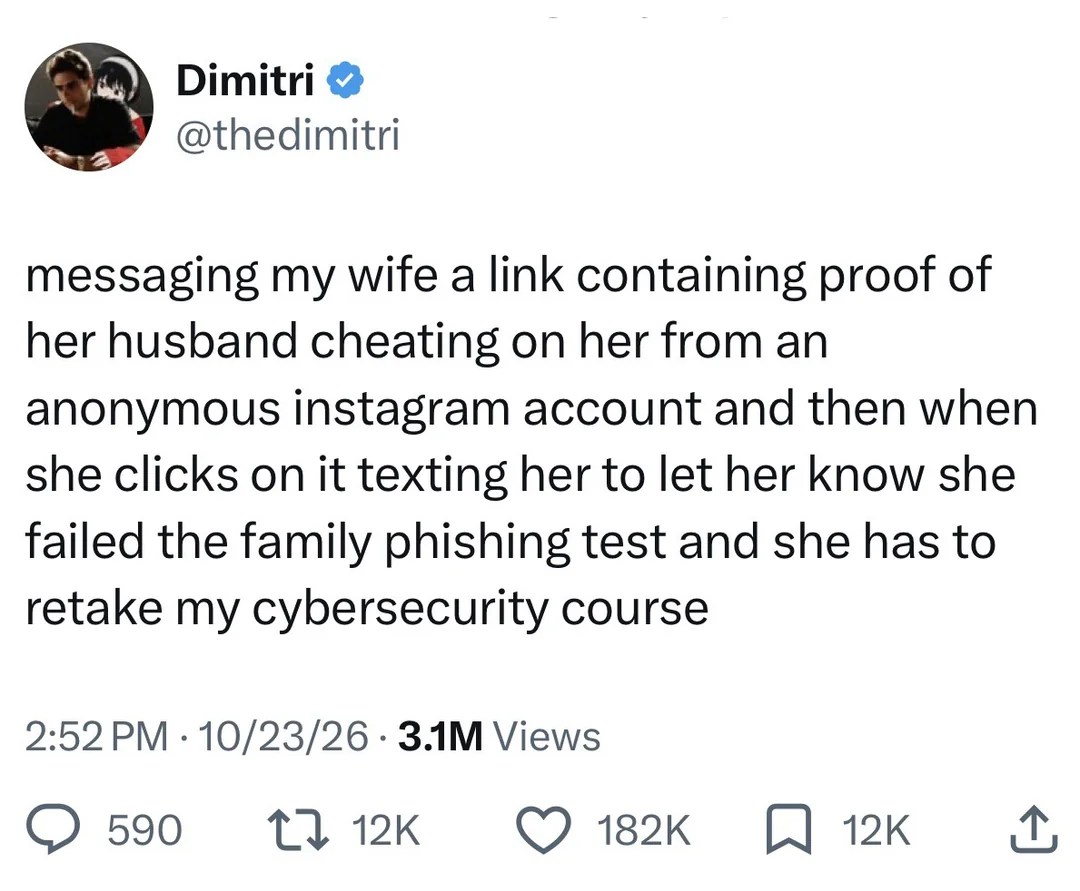

Sounds kinda like the Tale of Foolish Curiosity from Don Quixote. Spoiler: the wife was a good woman and wouldn’t have cheated on the guy… until he started being an asshole by subjecting her to endless tests to prove her virtue.
Just don’t read the mails and you won’t get fished
Note that at no point does he claim this “proof” is falsified.
So what about links on social media, say you beefed with the tankies, then one on an alt account sends you a link to an article, could be phishing no? What to do then?
Take a while to open it. If they Ping you and keep asking “Why haven’t you clicked the link yet?!” You’ll know they were Putin a trap in your DMs, and you got them by Stalin.
That Marx them as a phisher, Lenin credence to the simple fact that you can’t trust anybody on the internet these days.
Can’t be too careful! They come at you from so many Engels.
😎<br> 👉👉
Your comment is pure art
Mao.
Full Marx
Just read this to a beautiful woman I know.
Her response: That’s not going to end near as well/funny as you think/hope it will.
Neither is your future if your wife maintains such easily exploited vulnerabilities.
Blink 8 times if you’re in danger
Blink 182 times if it’s just all the small things
If not in danger, just take off your pants and jacket.
And your boots and your sunglasses…geev dem toa meeh.
— Arnold Schwarzenegger as The Terminator
Den get to da choppah
My knee jerk reaction is to calmly explain why this isn’t appropriate in a corporate environment.
I’m so broken.
My current company makes it real easy. All their simulated phishing addresses use the fictitious TLD of “.corn” so I just setup an email rule to filter them.
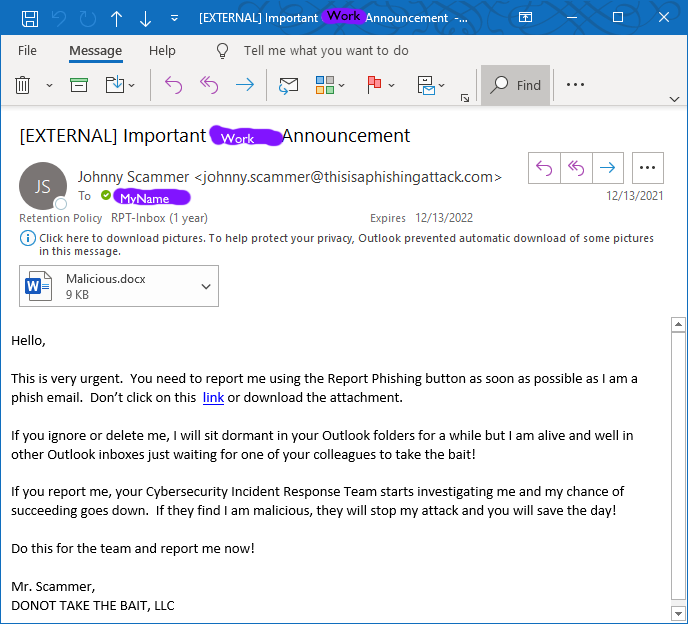
An actual email sent by my company. (not representative of their usual)
Yeah if anyone falls for this lock them out of their computer immediately.
Clearly he’s trying to trick you into pressing the “Report Phishing” button, which must be some sort of a trap. I’d check the attached document for further clues, especially since he’s telling me not to. Must be something interesting there
That’s pretty cool. Gets the point across - and the reason and results of why it matters to report instead of ignore. Kudos to your team.
…if you delete it, it’ll sit in your inbox? I…what?
in the Deleted Items folder. “Delete” just moves the email there. At my company anything older than a month in Deleted Items gets actually deleted. But more importantly if you just delete it, maybe nobody knows it’s’ there. If you report it the outlook team can delete it from the servers.
I suppose it means to say that it gets moved to trash and sits there.
I know this is a leap, but for some reason reading this made me want to buy a domain like virus.porn and make it the most wholesome, lemmy community on the planet.
Oh, you mean like penisland.net?
Or girlsof in stagam, which apparently has disappeared but used to be the story of the adventures of a person called Girlsof in the magical realm of Stagram.
I remember that one too, but think it was actually called Slütsof In Stagrâm

Just leaving their bare ass out there with no ssl, smh
It’s only one ssl. How much could it possibly cost? 4 dollars?!
I the worst part is deciding which flavor to get

Jesus… TIL
They can also be gotten for free through many providers, the biggest one in self-hosting is LetsEncrypt
I like that the most expensive one is called “wildcard”.
Sounds like it’s gonna perform AMAZING feats of security some of the time and just not work at all at other times.
Kinda like the wild mage of encryption 😁
WILDCARD SECURITY
It blasts the hackers off the face of the earth with orbital lasers! killer robots sever their network connection! It’s twirling a revolver on its finger while smoking three cigarettes!
And sometimes, that revolver goes off in your face, and it posts your private key on 4Chan.
Imma flex my EV
Isn’t TLS/SSL something at the server level and not the domain provider level?
You have to get a certificate from a provider which can verify you control the domain.
Once you’ve proved control you install the signed certificate with the secret private key on your server.
You can get certificates for free via Let’s Encrypt and a bunch more CA’s. It hasn’t been expensive for ages, unless you want fancy corporate support.
I tried securing my ass, but my browser got stuck.
Be the change you want to see! I’ll sign up straight away.
P1nkman, please report to the training room.

But there’s nothing here 😭
It can be yours for only $69/year!
Sure, but i don’t know how to set it up as a fediverse instance.
This reminded me of notpron.com
Anything but wholesome though…
Why not?
A company I was in a few jobs back had several layers of IT department, there was the local studio department that handled our everyday stuff and a “head office” somewhere far away that set policy and handed out budget and whatnot.
One day “head office” IT decided it was a good idea to send out some fake phishing emails to “test” us. They didn’t tell the local IT department about it, I guess they were also being “tested”. My manager received one and only recognized it as a phishing attempt after he’d clicked just one too many things for it to feel safe to ignore. So he yanked the power on his computer and contacted the local IT department, as is protocol when something potentially dangerous just happened.
The local network went into lockdown while local IT tried to figure out if something actually dangerous had happened. It cost the studio as a whole several hours of work time, which for a studio our size translated to an obscene dollar cost. Nobody on our side of things did anything wrong, even that one extra “dangerous” click my manager did wasn’t something he could be blamed for - head office had crafted the fake phishing attempt well and his reaction to it would have prevented damage had it been real.
Head office never tried a stunt like that again.
Given how common phishing attempts can be though, shutting down for every single one seems like overkill.
Phishing attempts that got far enough to actually show up in our internal corporate inboxes like that aren’t common, though. They’re normally blocked by the layers of firewalls and whatnot. We almost never saw email on those accounts from outside the organization itself, period.
And once you’ve run something capable of remote execution on a machine that’s inside the local network, with the sort of privileges that his machine had (he wasn’t just a bureaucratic sort of manager, he was writing code too), you don’t want to mess around.
All I could think as I read this was Dwight’s fire drill from the office
I’ve also never fallen for any of the phising emails the IT department sends to test me, my secret is almost never checking my email
My company sends at least one fake phishing email a week. They track stats for them on a security page and I wear it as a badge of honor that my report says 100% viewed and 0% reported.
My company makes you take a course of you fail one or if you ignore 4 or 5 so I have the highest reporting record of the company just because of how much I hate that course
I think they do that at my company too but in addition to not reporting phishing emails I have a personal rule that I don’t do any “mandatory” training unless someone in my management chain specifically asks me to. My boss probably gets annoyed by that occasionally but you’d be surprised how much of that stuff I never get asked about.
Last year our CISO personally reached out to me and asked me to do the course that’s overdue. I was a little nervous for a second and decided to obey.
Yeah that’s a good call. I don’t push back when asked directly I just pretend I didn’t see the emails. Most of the time it’s fine but the boring security stuff is usually the one they get me on.
My guess? Their bonus was tied to 100% compliance and you were one of the last people to do the training.
Nice. My company ties the bonus payment to completing all the mandatory training. You get many reminders from HR when the bonus payment is approaching
My company is using phishing simulations from a company that puts their company name in the x headers or every email, so that’s also easy filter.
As a bonus, that filter also throws all the full security training courses to junk
If we don’t report the emails as phishing it is considered a fail.
When they first started doing these tests unannounced, our IT department got a horrendous failure rate and then management had to announce that if we recognize it as a phishing simulation, we should still report it, and we also shouldn’t start poking around in the supposed phishing links. 😅
I report so many things from executive level because all of the training examples use exec comms as an example.
I’ll delete the failure report without reading that either.
…and then you don’t get into company Harvard, or what?
Kemming is 100 level preparedness.
They need to up their game to cover internationalized homograph vulnerabilities, using roughly similar characters from different international alphabets to create totally different domain names:
They look identical but are entirely different.
I do have a tendency to check where the link leads before clicking on it, so the difference between those two is quite obvious to me:
http://example.com/vshttp://xn--exmple-4nf.com/, but a lot of people probably do not do that.I would definitely not click on the second one.
Well that’s just rude
lucky you. they fail us if we don’t right click report phishing.
Can still set up a header-matching rule - just need to mark the email with a label, so you can report it without even having to read it.
I have over 8000 unread mails in my inbox. Whoever contacts me used Slack. I don’t give a fuck about emails unless DMs me “hey can you maybe answer that customer mail I forwarded you?”
So I would have a fabulous time with such a stupid policy.
Mine includes a header so their mark filter knows to ignore it.
At this point, I’m pretty sure that every employee who has been there for more than a month has written or at least copied a filter to delete any email with that header.
I’ve never been comfortable with that kind of mass deletion and we have, AFAIK, unlimited mailbox storage, so I just set my version to mark those emails as read.
If your company contracts with phish.me then that URL is actually in the email header metadata.
Just set up a rule for the word phish to a special folder, and then you can use the “report” button on everything in that folder to get the credit.
KnowBe4 includes a bunch of headers in the email, including a disclosure saying they have permission to run the simulated phishing test.
Where might I find more details to set up filters?
In the gmail web client, I dont see an option to filter off headers. thunderbird lets you set up filters for custom headers, but it’s a bit more complicated.
TBH, i never used it to set up a custom filter, I just knew there were indicators I could use to figure out if an email was in fact a test
My work computer is quite locked down (can’t even install Solitaire or Minesweeper), so I’ll have to set up whatever filter in Outlook. And I think it deletes the messages once flagged as phishing, so I don’t think I have one to inspect right now.
Anyway, some random blog seems to point back to KnowBe4’s whitelisting guide, so I think the filter would need to look for something in the header or for the specified IP addresses?
I heard a rumour that KnowBe4 have ties to Scientology.
From what some Googling told me, Kevin Mitnick is a scientologist, as is most of the upper management .
Not really relevant here, just interesting…
Tell me more…
Apparently I’m both right and wrong.
At a previous job, there was a header. I can’t remember it directly, but lets say it was like this:
X-Acme-Security-Test: Authorized simulated phishing exercise conducted by KnowBe4 on behalf of Acme Corp for security awareness training and compliance validationApparently KnowBe4 lets customers set their own custom headers. So this was probably set by my company. And not something everyone will see.
But also, they set an
X-PHISHTESTheader. Maybe its a signed header, so they can cryptographically prove the test was in accordance with the customer’s request (this email was sent by us, but it uses YOUR private key, so clearly you were involved here, and we arent just scamming people, or otherwise allows you to validate it at the firewall/spam filter). This isn’t the header I remember, but apparentlly can also be used to detect them – the explicitly say not to do that, but here we are.But if you ever get a knowbe4 phishing test, check the email headers. you’ll probably find something to key off of.
I just take it one step farther and never open any email. If it’s important you will CC my manager and he will physically come by my office and tell me about the email, giving me multi-factor phishing protection. If he demands I open an email then I am absolved of responsibility.
My place has this thing where most phishing test emails are obvious but every once in a while they’ll drop a really good one, sometimes these even pose as our managers.
The company I work for has lots of training to recognize phishing attempts, and then they proceed to send emails that tick most of the “avoid this” boxes.
Lmfao, .corn sounds like an instance someone would spin up to compete with lemmy.beans
I’d fail this so freaking hard omfg 😭
Bf sends link? I click
Complete internet stranger sends link? I click
Thoughts? None
Brain? Empty
Other family members send me a link? Eeh, I get a bit suspicious, then I click 😂God I’m so old…at twenty already 😭
You have to get old when you’re young that way you’ve got experience.
IM 23 MIISH 😭
https://ferociter.itch.io/cataractae here’s a random link for y’all.
Damn, you are doomed and you know it eh
My work email is a .edu, and so most of ours are just social media phishing attempts with fake IG and Tiktok links. But why I’m the world would you use .edu for those?
You wanna target .edu, do a quick check on our publicly accessible faculty pages and pretend to be us. I swear, we’ve got like zero protection against that, lol.
Hey Barb, I forgot my keys, please leave the garage open. Thanks, Jeff.
Boom, stole the faculty coffee maker.
You can probably fence that for more than the $300,000 spectrometer.
You are my world, even if voice to text used to work before AI, but fucks up the simplest shit now.
I saw one with a bunch of maga triggers. The Democrats are doing what!? 😱 they click every time.
I use dried/powdered abortion to slip into my antifa uniform.
Make sure not to get any gender fluid in there too, or the resulting paste makes removal very difficult
I failed one of those because I have script blockers on my browser and I wanted to see what the scam was.
The URL is likely unique to identify you as soon as you have clicked.
Simply write a script to cycle through thousands of URLs. The whole company will get identified and then nobody has to retake the training.
I suspect that there are more than a few thousands URLs to if you want to go down that route.
Yeah, that’s why I had to take the online safety course again.
It wouldn’t have been able to do much to my computer though, if it really was a suspicious site.
I got to take security training for that once, too.
It was worth it.
Same, script blocker, virtual machine, etc. Found that apparently you are not meant to forward/report the scam to IT either.
Moral of story: Never inform the company of any suspicious behavior; just ignore it.
There’s a button that says report phishing for many companies
Keyword here being “many companies”.
I’ve set my last name in caps. So any IT Phishing script using a <placeholder lastname> just sends my name in caps. And then I just set up a filter.
They should really try and make them more believable
Hello Jelle WHO, You’re no gonna believe it! We’re having issues delivering your packaged extended warranty which claims that your social security bananafits will expire unless you take immediate action. Click this link to know more on how to win big with crypto.
Lol@ “bananafits”
There’s usually nothing wrong with just clicking a link (if your browser is set up correctly). The problem begins if you actually enter any sort of information in a random website or something.
Be extra careful if you’re logged in on any other site in another tab though. Or even if you closed the tab.
The thing is, a link in an email is not any different than a link here on Lemmy, yet we click on those all day. Yes, both could lead to a malicious website, and if you don’t have a recent web browser, then you could get in to trouble without any action.
IMO, the only reason why there is a focus on phishing simulation in orgs is because email is something IT owns and you can easily track who does and doesn’t open an email. If there is a legitimate concern with opening random links, then phishing simulations would also extend to maybe peppering fake links on LinkedIn or other places where IT thinks their co-workers are browsing, but no one (AFAIK) does this.
No, you generally should not be worried about that.
Generally the worst thing that a website can get from you just opening a URL is (1) whether or not you’re logged in to google/facebook/etc, (2) your advertisement profile/who you are, (3) roughly where you are. All those are privacy issues, not a security issue, hence not very related to the “cybersecurity course”, and only the first one is tangentially related to being logged in.
You should of course use various anti-tracking measures, e.g. an adblocker, “resist fingerprinting” in Librewolf, user agent faker, a good VPN, etc. That will reduce the exposure to all 3 issues above, but once again those are not security problems.
You should also never download random bullshit to your computer. Having an actual file on disk outside the browser sandbox could indeed be an issue. You could simply forget where it came from and decide to execute it one day, or there could be some bug in some app on your OS which could trigger a code execution exploit.
However, if your browser shares authentication details with random websites like what you are describing, you should stop using it immediately.
Can you elaborate on this?
from what i’ve heard, even if something isn’t able to break out of your browser, it may be able to gain access to cookies. those cookies in turn can carry a lot of info and even unlock some accounts. iirc that’s how the linux tech tips channel got into trouble.
everyone, please correct me where i’m wrong. thank you.
Cookies are specifically separated out per-domain. Your browser will not give a random website access to your auth cookies/localstorage for other websites. There are some awful companies which do set cross-website cookies (e.g. facebook, google, and other adware), but (1) those cookies are not auth credentials and are used mostly for fingerprinting and ad targeting, (2) should be filtered out by your browser’s tracking protection (hence “if your browser is set up correctly”).
Realistically there is still be a way for the website to fingerprint you enough to know who you are even without cookies, so the most adversarial outcome from clicking a link is that the attacker can know that you clicked that link, along with your general location (from geoIP) and some device info.
iirc that’s how the linux tech tips channel got into trouble.
Nah, that was pretty much an .exe sent out by a fake sponsor, which was downloaded and executed. It then stole all browser data (including google auth cookies). Opening a link ≠ running an unsandboxed exe.
Linux tech tips guy opening a .exe file is oddly frustrating to me.
all i can say is that i need to log into outlook to log into teams, because logging into teams directly is broken, but the cross site cookie work…
and reading stuff like adFection really doesn’t instill confidence in opening random websites.
but most probably you’re right for most cases.
This works because loggin in to outlook sets a cookie for login.microsoftonline.com which is reused by other Microsoft products. Each product requests a token from login.microsoftonline.com and as long as you have a valid cookie for that domain it will return a token that the app (outlook/teams/onedrive/etc) can use to access its own api.
The cookie itself stays bound to login.microsoftonline.com and it’s never shared with other domains and the service at login.microsoftonline.com will not provide tokens to requests from non-microsoft domains.
all i can say is that i need to log into outlook to log into teams, because logging into teams directly is broken, but the cross site cookie work…
Thankfully I don’t even have an MS account, but I do implore you to check out the cookies and see for yourself that they will have a specific list of domains they are valid for.
Open the browser developer menu on an Outlook tab (F12), navigate to “Storage” → “Cookies” (may be named slightly differently in different browsers), and look at the “Domain” column in the table.
and reading stuff like adFection really doesn’t instill confidence in opening random websites.
The problem there is website operators selling their adspace to a literal israeli spyware company, which meant injecting adversarial javascript into their own pages. It was not a case of “user opening a random link”, rather it was the website operator themselves forwarding the user malicious JS from the “ad company”. As a user there’s generally nothing you can do to prevent this kind of attack where the website itself was compromised; besides, without another vulnerability/attack vector the impact will be limited to the website in question.
Does that make it dangerous to log in persistently anywhere, period, in case you click on a shady link? I legitimately don’t know much and trust common sense prevention (run sites through virus total if I’m not familiar with them) and built in protection to do most of it, and I haven’t had any known password thefts from anything other than servers getting hacked. I do have an authenticator app and use it on really important stuff (government, school) but that’s about it.
well, i’ve been taught that keeping cookies around is somewhat dangerous, and that because of that browsers like librewolf always clear your cookies. i’m by no means an expert tho, so you might wanna read the other commenters input on that.
The other commenter is wrong, overconfident, and said earlier today that it’s basically impossible to lock your keys in a car. I would run, not walk, from any tips they have.
This is extremely bad advice and is akin to saying there is nothing wrong with shooting someone in the chest as long as they’re wearing a bulletproof vest.
Sketchy websites should be avoided. Even experts don’t think of everything possible to attack.
It’s the same reason you shouldn’t expose your pc directly to the internet even if you have a secure os installed.
…Bonus points for you in another thread today doubting that it’s possible to lock one’s keys in a car.
Second panel: this is the setup to his torrid public affairs, which he now has deniability for
This kills the trust
Yeah, the wife didn’t trust the husband and clicked the link. Shameful, tbh